Projects home keeps the local service organized
Guildhall behaves like a local service over projects, not a one-repo session. Attach a folder, scan what is moving, and open the shell that actually needs your eyes.
What Projects & Workspaces answers quickly
- Can this project run at all?
- What is blocked or on fire?
- Which shell needs attention first?
If the page cannot answer those three questions fast, it is decorating instead of helping.
Current labels
The current app labels this screen Projects & Workspaces. Its top row is the service-level readout:
- Guild hall: registered project count and which guild roles are present.
- Work mix: active, ready, waiting-on-you, and done work across projects.
- Attention: the first project that needs your answer.
- Running now: which projects have live runs.
- Needs you: opens the fleet view of projects and items waiting for your answer.
- Provider: the machine-default provider and worker model group, with a route to global Providers when the default or model choice needs attention.
Project cards then show their local state with chips such as Paused, Queued, Needs task briefs, Mixed, Stable, or Inspect. In 0.10.0, cards can also surface Git Story health: dirty work, local commits, branches without upstreams, open PRs, and task worktrees that still need a clear ending. Runtime setup, migration needs, provider mismatches, and questions for you should appear as readiness blockers before the card asks you to start work.
The actual job of each card
- Project identity and whether the service still recognizes it
- Run status and whether the project is live, paused, queued, stable, or needs inspection
- Blocked work, imported drafts, and unresolved escalations
- Git closure state when the repo or a task worktree is not yet cleanly closed
- Enough signal to tell whether opening the shell is likely to be a quick check or a proper firefight
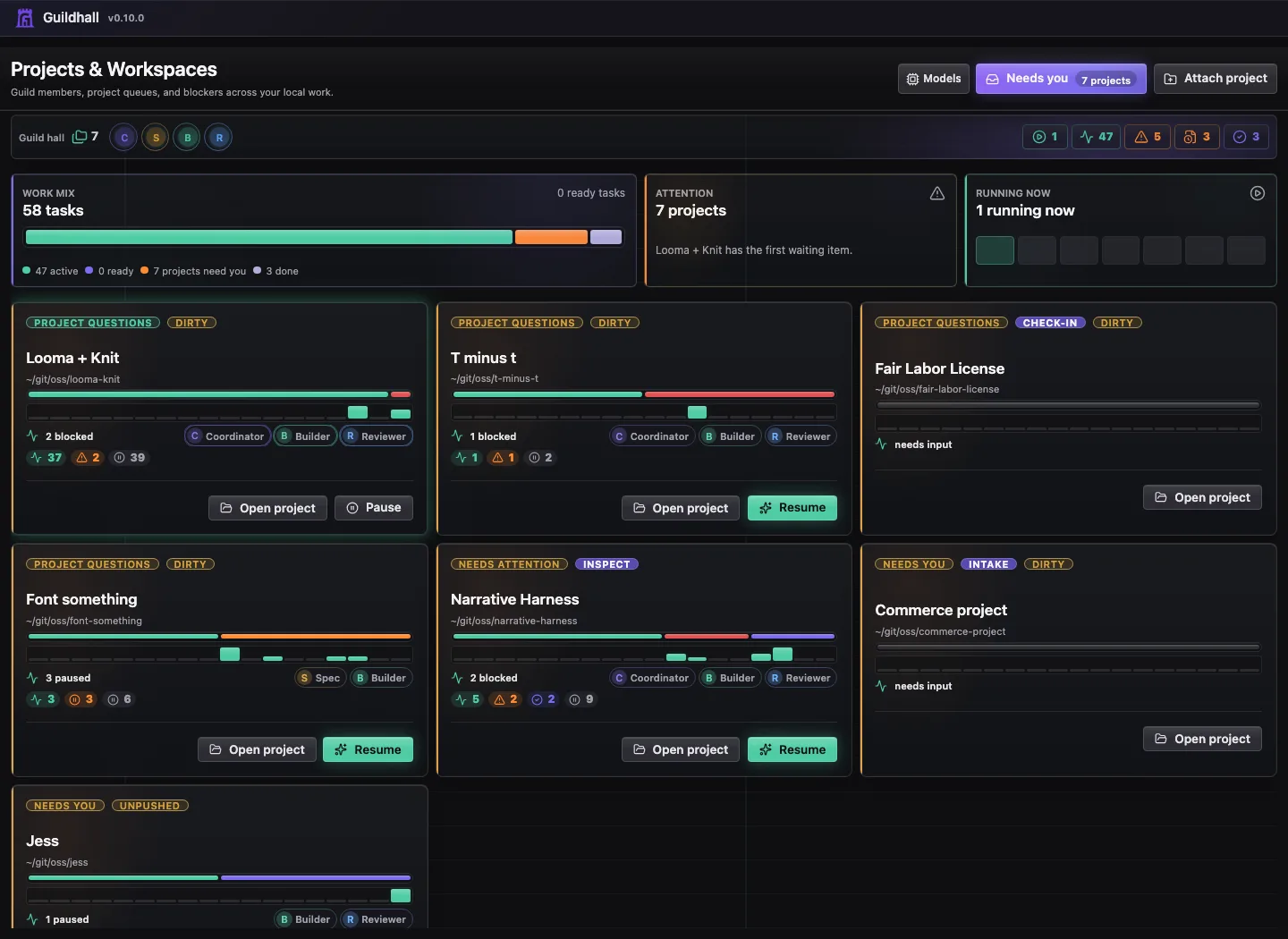
The Projects home is deliberately shallow. It helps you choose where to look next; the detailed project shell stays inside each project. Project groups Overview, Map, Needs you, Facts, and Structure so the project skeleton, alerts, and discovered facts stay together. When you are in Project, those child links stay visible. Map is the 1,000-foot release-and-capability view; Structure is the codebase and cross-project map. When you move into Work, the rail shows Queue and Board instead; Release shows the selected release, readiness, proof, and deferred work. Threads, Timeline, and Settings do not add extra child links in the rail.
Provider defaults on the home view
The home view shows the configured default provider before you enter a project. If OpenAI-compatible models are the default, you see that provider and the active worker model group there. The chip opens global Providers, because a bad machine default is a service-level problem, not a thing you should hunt for in every project.
When the preferred provider is unavailable, or the model choice points somewhere that does not match the selected provider, Guildhall keeps a warning visible. The run may still have a fallback path, but the mismatch should not be a secret stowaway.